



What Is App Development? A Complete Beginner's Guide to Building Apps in 2026
Learn what app development is, how mobile apps are built, Android vs Flutter development, what beginners should learn, and how to start your app development journey in 2026.
Every app you use—from a banking app to a food-delivery app, social network, or learning platform—started as an idea that developers turned into software.
App development is the process of designing, building, testing, deploying, and maintaining applications for mobile devices and other platforms.
For beginners, the confusing part is usually not what app development is. The real questions are: What should I learn first? Should I learn Android or Flutter? Do I need programming first? How long does it take? What tools do professional developers use?
Why Learn App Development?
Mobile devices are one of the most important software platforms in the world. As a June 2026 snapshot, Android accounted for 68.45% and iOS 31.42% of worldwide mobile, tablet and console operating-system share according to StatCounter Global Stats.
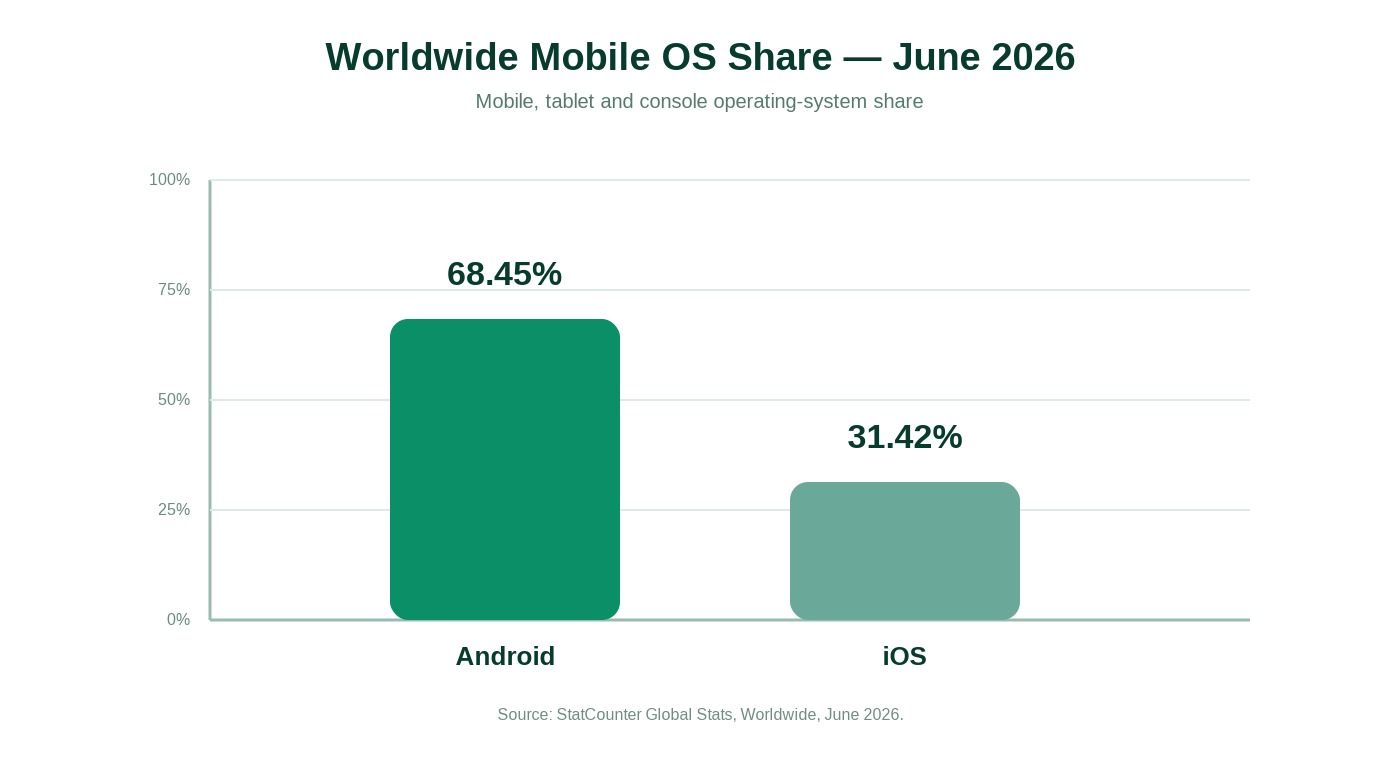
Source: StatCounter Global Stats, worldwide, June 2026.
This does not mean every beginner must become an Android developer. It shows why mobile software is a large and useful platform to understand.
The 3 Major Paths to App Development
1. Native Android Development
Native Android development means building applications specifically for Android. The modern Android ecosystem is Kotlin-first and increasingly Compose-first, using Kotlin, Android Studio, the Android SDK, Jetpack and Jetpack Compose.
Choose this path if you want to specialize in Android and understand the platform deeply.
2. Flutter Development
Flutter takes a cross-platform approach. It lets developers build applications for multiple platforms from a shared codebase, using Dart.
Choose Flutter if you want to build cross-platform applications and move quickly from an idea to a working product.
3. Broader App Development
App development is bigger than a single framework. A strong developer also needs programming, UI/UX, APIs, databases, authentication, state management, networking, testing, Git, deployment, security and performance fundamentals.
Android vs Flutter: Which Should You Learn?
GoalGood starting pathDeep Android developmentKotlin + AndroidNative Android UIKotlin + Jetpack ComposeCross-platform developmentFlutter + DartOne codebase for multiple platformsFlutterDeep Android platform knowledgeNative AndroidThere is no universal winner. The better choice depends on what you want to build and where you want to work.
What Do You Need to Learn?
Think of your journey as six layers. Each layer gives you a foundation for the next.
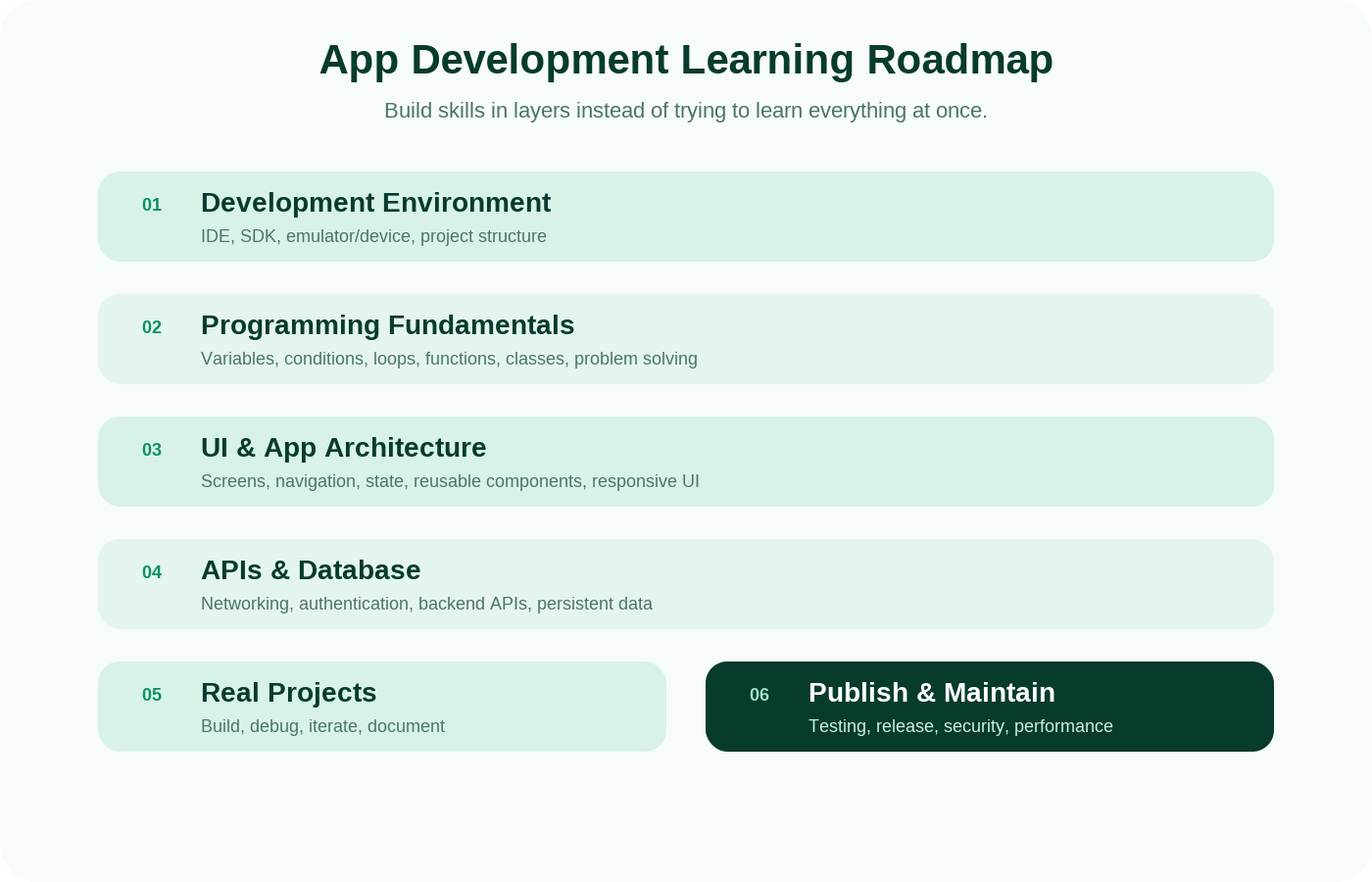
Layer 1 — Development Environment
Learn your IDE, SDK, emulator or physical device, project structure and debugging tools. Android developers commonly use Android Studio. Flutter developers use the Flutter SDK with an editor such as Android Studio or VS Code.
Layer 2 — Programming Fundamentals
Learn variables, data types, conditions, loops, functions, classes, collections, error handling and basic problem solving. Android learners should learn Kotlin. Flutter learners should learn Dart.
Layer 3 — UI and App Architecture
Learn screens, navigation, forms, lists, state, responsive layouts and reusable components. Modern Android UI is increasingly built with Jetpack Compose, while Flutter interfaces are built from widgets.
Layer 4 — APIs and Databases
Real applications need data. Learn how the frontend communicates with APIs and how backends and databases store information. A learning app, for example, might need accounts, courses, lessons, progress, payments and notifications.
Layer 5 — Build Real Projects
Do not spend months only watching tutorials. Build projects. Start with a calculator, to-do app, notes app or quiz app. Then move to weather, news, expense tracking, e-commerce or course-learning apps.
Layer 6 — Publish and Maintain
Professional development includes testing, release management, security, performance, analytics, bug fixing and ongoing maintenance.
How Long Does It Take to Learn App Development?
There is no honest universal timeline. Your progress depends on your previous experience, weekly study time, practice quality and how much independent project work you do.
Instead of measuring progress only by months, use capability milestones:
- Beginner: understand fundamentals and build simple screens.
- Developing: build multi-screen apps and work with APIs and databases.
- Project-ready: independently build a complete application and solve problems without following a tutorial line by line.
- Professional growth: improve architecture, testing, performance, security, deployment and teamwork.
What Should You Learn First?
- Programming fundamentals
- Choose Flutter or Android
- Learn UI development
- Navigation and state
- APIs and networking
- Database and authentication
- Real projects
- Testing
- Publish your app
Flutter or Android: A Simple Recommendation
Choose Flutter if:
- You want cross-platform development.
- You want to experiment with multiple supported platforms from a shared codebase.
- You enjoy building UI quickly.
Choose Android if:
- You specifically want to specialize in Android.
- You want deep knowledge of the Android platform.
- You want to learn Kotlin and Jetpack Compose.
Still confused? That is normal. You do not need to make the perfect decision on day one. Choose one path, build something real, and learn deeply enough to understand what you are doing.
The Most Important Skill Is Not a Framework
Flutter, Kotlin, Android Studio, Jetpack Compose and other technologies will continue to evolve. Your fundamentals matter longer.
Think → Break down problems → Design a solution → Write code → Debug → Test → Improve.
That is what turns someone from a tutorial follower into a developer.
Your First Goal
Do not make your first goal “I want to learn everything about app development.” Make it “I want to build and understand my first real application.”
Then build another. Every project will expose something you do not understand yet. That is normal. That is learning.
Ready to Start Learning App Development?
If you want a structured path instead of jumping between random tutorials, explore the App Development Course. If you are specifically interested in cross-platform development, explore the Flutter App Development Course. If your goal is native Android development, explore the Android App Development Course.
Final takeaway: App development is not simply about learning a programming language. It is about learning how to turn an idea into a working product. Start with fundamentals, choose a path, build real projects, learn how apps communicate with APIs and databases, and then learn how to test, publish and maintain what you build.
You do not need to know everything before building your first app. You learn by building.